
Learning Overview
In this project, learners explore how technology supports smart and sustainable farming using a Micro:bit, relay module, DC pump, and sprinklers. They automate crop watering, learning how coding and robotics can save water and reduce manual work. We have included extra challenges that encourage learners to experiment with different watering schedules and setups, making learning fun and hands-on. Through this experience, learners develop creativity, logical thinking, and problem-solving skills. The project also introduces AI ideas, showing how smart irrigation systems can analyze soil, predict plant needs, and optimize water use while promoting environmental responsibility.
What You will Need
| Item | Purpose |
|---|---|
| BBC micro:bit | The brain of the smart farm system |
| Soil Moisture Sensor | Detects whether the soil is wet or dry |
| Red LED | Lights up when the soil is dry |
| Green LED | Lights up when the soil is wet |
| 3V Relay Module | Controls the DC water pump using the Micro:bit signal |
| DC Water Pump | Pumps water to irrigate plants |
| External Battery Pack (5V or higher) | Safely powers the water pump |
| Jumper wires | Connect all components together |
| Breadboard | Assembles the circuit |
| Resistors (220Ω) | Protect LEDs from excess current |
Understand the Circuit
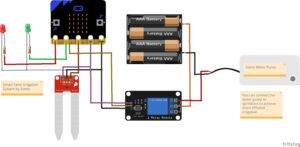
Here’s how different components connect:
Soil Moisture Sensor
Detects whether the soil is wet or dry
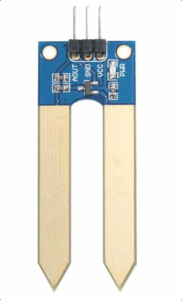
Connections:
VCC → connects to 3V on micro:bit
GND → connects to GND on micro:bit
Analog Output → connects to P2 on micro:bit
Red LED
Indicates dry soil.

Connections:
- Anode (long leg +) → connects to P0 on micro:bit
- Cathode (short led -) → connects to GND via 220Ω resistor
Green LED
Indicates wet soil.
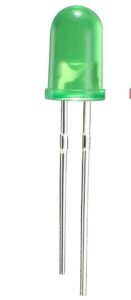
Connections:
- Anode (Long leg +) → connects to P1 on micro:bit
- Cathode (short leg -) → connects to GND via 220Ω resistor
3V Relay Module
Acts as an electronic switch to control the higher-power
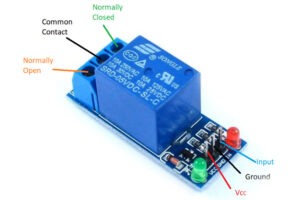
Connections:
- VCC connects to the 3V pin on the micro:bit (since the coil operates at 3V).
- GND connects to the GND of the micro:bit.
- IN (Input) connects to Pin P8, which sends a digital signal to activate or deactivate the relay.
On the relay output side (the high-current side):
- The COM terminal connects to the positive terminal of the external battery.
- The NO (Normally Open) terminal connects to the positive wire of the DC water pump.
- The pump’s negative wire connects directly to the negative terminal of the external battery.
DC Water Pump (3V–5V)
Waters the plants automatically.
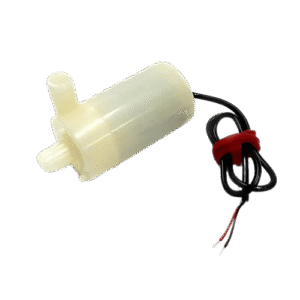
Connections:
- Positive (+) terminal → connect to the NO (Normally Open) pin on the relay module
- Negative (–) terminal → connect to negative (–) terminal of the battery
The Project Code
Follow these steps carefully to open and explore the project in Microsoft MakeCode for Micro:bit:
When you open the link, you will see a few colorful blocks that makes the project.
Next, click Edit Code tab to be directed to the MakeCode editor
Uploading the Code
Plug in your Micro:bit to your computer using a USB cable, then follow the steps in the video to upload your code and bring your project to life!
Understand the Code
| Block | What It Does |
|---|---|
analogReadPin(P2) | Reads soil moisture sensor values |
if (soil > 500) | Checks if the soil is dry |
digitalWritePin(P8, 1) | Activates relay → turns pump ON |
digitalWritePin(P8, 0) | Deactivates relay → turns pump OFF |
pause(1000) | Waits 1 second between checks |
Troubleshooting the code
- Problem: Pump doesn’t run
Possible Cause: Wrong relay wiring or missing power.
Check external battery connection to the pump; don’t power the pump directly from the Micro:bit. - Problem: LEDs not lighting
Possible Cause: Wrong polarity.
Reverse LED connections—long leg goes to positive, short leg to GND. - Problem: Always shows “dry”
Possible Cause: Threshold setting too high or sensor not calibrated.
Adjust threshold (try 200–600) and test in real soil for accurate readings. - Problem: Relay keeps clicking
Possible Cause: Unstable sensor readings.
Add a short pause between readings or average multiple readings for smoother operation.
What You Have Learned
- How to detect soil moisture using a sensor.
- How to control LEDs and a DC pump through a relay.
- How to automate irrigation using a microcontroller.
- How analog and digital pins interact in real-world systems.
Extra Challenge
Add a buzzer (P16) to alert when the soil is dry.
Display messages like “DRY!” or “WET!” on the micro:bit screen.
- Try different soil types, sandy, loam, clay, etc.
Log the soil moisture readings to your computer for analysis.
AI Extension Ideas
Use either Micro:bit's CreateAI or Edge Impulse to build, train, and deploy machine learning (ML) models to make the watering system smart and caring. The AI can learn from soil moisture data and predict when plants need water.
For Example:
Soil Helper AI: The Micro:bit observes soil readings over time and learns when the soil usually becomes dry. It then predicts the best time to water the plants.
Smart Watering Lights: The AI changes LED colors to show what it thinks will happen next, green for “soil will stay wet” and red for “soil will dry soon.”
Fun Farm Game: Students test the AI by watering plants early or late and see if the AI’s prediction was correct.