
Learning Overview
In this project, learners explore how technology supports hygiene and public health using Arduino. They build an automated hand-washing station that controls water and soap without physical contact, using sensors and simple code. We have included extra challenges that encourage learners to experiment with timing and sensor placement, making learning fun and hands-on. Through this experience, learners develop creativity, engineering skills, and problem-solving abilities while discovering how automation can reduce the spread of germs and improve safety in schools, markets, and other community spaces.
What You Will Need
| Item | Purpose |
|---|---|
| Arduino Uno R4 WiFi | Controls the hand-washing system |
| Breadboard | Used to connect low-power components |
| Infrared (IR) Sensor | Detects a hand under the tap |
| Relay Module (5V, 1-Channel) | Safely switches the water pump |
| DC Water Pump (5–12V) | Pumps water when activated |
| External Power Source (for pump) | Powers the water pump |
| LED | Indicates water flow |
| 220Ω Resistor | Protects the LED |
| Jumper Wires | Connect all components |
| USB Cable | Programs and powers Arduino |
Understand the Circuit
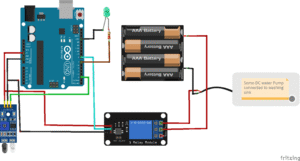
Here’s how different components connect:
Infrared (IR) Sensor
When a hand is detected, the sensor sends a signal to Arduino.
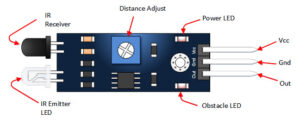
- VCC → connects to the 5V on the Arduino
GND → connects to the GND on the Arduino
OUT → connects to digital Pin 2 on the Arduino
The Green LED
Indicates Water Flow
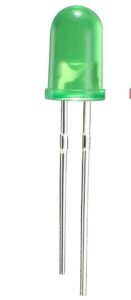
Connect the long leg (positive) of the LED to one end of a 220Ω resistor
Connect the other end of the resistor to digital pin 7.
Connect the short leg (negative) of the LED to GND.
5V Relay Module
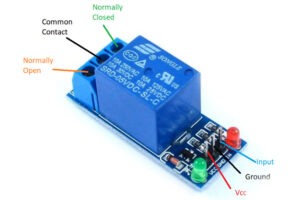
The relay has two sides: the control side (Arduino) and the high-current side (pump).
Control Side (Arduino)
VCC → connects to the 5V on the Arduino
GND → connects to the GND on the Arduino
IN (Input) → connects to digital pin 8 on the Arduino.
On the relay output side (the high-current side):
- The COM terminal connects to the positive terminal of the external battery.
- The NO (Normally Open) terminal connects to the positive wire of the DC water pump.
- The pump’s negative wire connects directly to the negative terminal of the external battery.
The DC Pump
Pumps water when activated
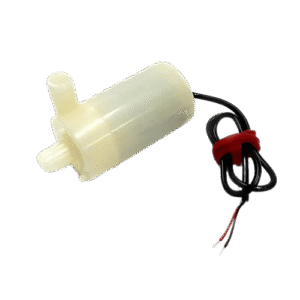
- Positive (+) terminal → connect to the NO (Normally Open) pin on the relay module
- Negative (–) terminal → connect to negative (–) terminal of the battery
Important: The DC pump uses a separate power supply and is controlled safely using a relay.
The Project Code
Open the Arduino IDE on your computer and type this code:
int irSensor = 2;
int relayPin = 8;
int ledPin = 7;
void setup() {
pinMode(irSensor, INPUT);
pinMode(relayPin, OUTPUT);
pinMode(ledPin, OUTPUT);
digitalWrite(relayPin, LOW); // Pump OFF
}
void loop() {
int handDetected = digitalRead(irSensor);
if (handDetected == HIGH) {
digitalWrite(relayPin, HIGH); // Pump ON
digitalWrite(ledPin, HIGH); // LED ON
delay(3000); // Wash time
} else {
digitalWrite(relayPin, LOW); // Pump OFF
digitalWrite(ledPin, LOW); // LED OFF
}
}
Uploading The Code
- Connect your Arduino Uno to your computer using the USB cable
- In the Arduino IDE, go to:
- Tools → Board → Arduino Uno
- Tools → Port → (Select your Arduino port)
- Click the Upload button (the right arrow icon).
- Watch your project come to life!
Understand The Code
| Code | What It Does |
|---|---|
| IR sensor input | Detects hand presence |
| Relay output | Controls the water pump |
| LED output | Shows water flow |
if condition | Decides when to release water |
delay(3000) | Controls washing duration |
Troubleshooting the code
Pump does not turn ON
Check external power supply
Ensure relay COM and NO are correct
Water flows continuously
Adjust IR sensor sensitivity
Check sensor alignment
LED not lighting
Check LED polarity and resistor
Relay clicking but pump not running
Check pump voltage rating
What You Have Learned
How touch-free systems improve hygiene
How sensors detect objects
How relays safely control high-power devices
How automation saves water
Real-world applications in public health and smart cities
Extra Challenge
Add a soap dispenser pump
Add a timer display using an LCD
Limit water flow per person
Send usage data using WiFi
Add solar power support