
Learning Overview
In this project, learners explore how technology can detect and respond to fire hazards using the Calliope Mini. They use flame sensors to detect flames and program the device to trigger alerts or safety actions, such as activating a fire sprinkler. We have included extra challenges that encourage learners to test different alert signals and response actions, making learning engaging and hands-on. Through this experience, learners build problem-solving skills, safety awareness, and responsibility while discovering how coding, robotics, and smart systems can help protect homes, schools, and communities.
What You will Need
| Item | Purpose |
|---|---|
| Calliope Mini V3 | Main controller for fire detection and emergency response |
| Flame Sensor | Detects fire |
| Buzzer | Produces loud fire alarm sound |
| Small DC Water Pump (3V–5V) | Acts as a mini fire hydrant to spray water |
| Sprinkler Head | Sprays water over the “danger area” |
| 3V Relay Switch | Allows Calliope to safely turn the pump ON/OFF |
| External AA Battery Pack | Powers the water pump |
| Jumper Wires | For circuit connections |
| USB Cable | For uploading the program |
Understand the Circuit
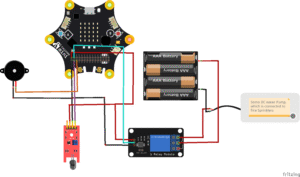
Here’s how different components connect:
Connect the flame sensor:
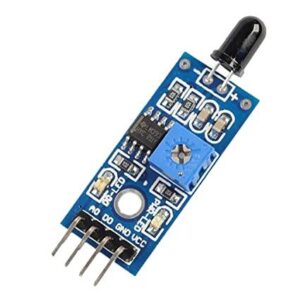
VCC → connects to Calliope Mini 3V
GND → connects to Calliope Mini GND
Analog OUT (AO) → connects to Calliope Mini Pin P0
Connect the buzzer:

Positive → connects to Calliope Mini Pin P2
Negative → connects to Calliope Mini GND
Connect the 3V Relay module:
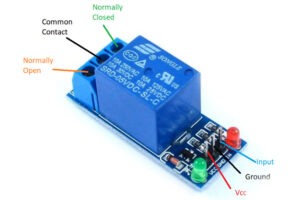
- VCC connects to the 3V pin on the Calliope Mini (since the coil operates at 3V).
- GND connects to the GND of the Calliope Mini.
- IN (Input) connects to Pin 1, which sends a digital signal to activate or deactivate the relay.
On the relay output side (the high-current side):
The COM terminal connects to the positive terminal of the external battery.
The NO (Normally Open) terminal connects to the positive wire of the DC water pump.
The pump’s negative wire connects directly to the negative terminal of the external battery.
Connect the DC water pump:
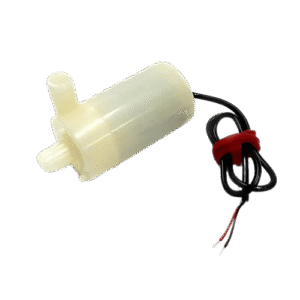
- Positive (+) terminal → connect to the NO (Normally Open) pin on the relay module
- Negative (–) terminal → connect to negative (–) terminal of the battery
When fire is detected, Calliope turns ON the buzzer and activates the relay, which powers the pump to spray water through the fire sprinklers.
The Project Code
Follow these steps carefully to open and explore the project in MakeCode for Calliope Mini:
When you open the link, you will see a few colorful blocks that makes the project.
Next, click Edit Code tab to be directed to the MakeCode editor
Uploading the Code
Plug in your Calliope Mini to your computer using a USB cable, then follow the steps in the video to upload your code and bring your project to life!
Understand the Code
| Code Block | What It Does |
|---|---|
set fire to 0 | Creates a variable called fire and sets its starting value to 0. This variable will store the flame sensor reading. |
forever | Repeats all the blocks inside continuously so fire is monitored all the time. |
set fire to analog read pin P0 | Reads the flame sensor value from pin P0 and saves it in the fire variable. |
if fire < 300 then | Checks if the sensor value is below 300, meaning fire or flame is detected. |
show skull icon | Displays a skull icon to warn that there is a fire danger. |
digital write pin P2 to 1 | Turns ON the alarm or buzzer connected to pin P2. |
digital write pin P1 to 1 | Turns ON the water hydrant pump to help put out the fire. |
pause 5000 ms | Keeps the alarm and pump active for 5 seconds. |
else | Runs when no fire is detected (sensor value is 300 or higher). |
show happy icon | Displays a happy face to show the area is safe. |
digital write pin P2 to 0 | Turns OFF the alarm. |
digital write pin P1 to 0 | Turns OFF the water pump. |
pause 200 ms | Waits a short time before checking for fire again. |
Troubleshooting the code
Pump not running?
Ensure the relay is connected to P1 and the pump uses external power, not Calliope power.Flame sensor always detects fire?
Adjust the sensitivity knob on the sensor (if available).No alarm sound?
Check polarity of the buzzer and connection to P2.Sprinklers activate too much?
Increase threshold value from 300 → 350 or 400 depending on light conditions.Fire icon not showing?
Ensure your sensor’s OUT pin is connected to P0.
What You Have Learned
How a flame sensor detects fire
How relays safely control pumps
How alarms and water sprinklers activate automatically
How microcontrollers protect buildings using decision-making
Importance of technology in school safety and emergency systems
Basics of automation, safety engineering, and simple robotics
Extra Challenge
Add a Reset Button using Pin P3
→ When pressed, it turns off the pump, silences the buzzer, and resets the fire alert system.Add an LED strip:
Red = Fire detected
Yellow = Warning
Green = Safe
Add a temperature sensor for dual fire-detection safety.
Create a full school building model with classrooms and roof sprinklers.
Add sound effects: emergency siren, firefighter voice, or evacuation alert.
Add a real-time timer that logs the duration of the emergency event.
AI Extension Ideas
Use Edge Impulse to build, train, and deploy machine learning (ML) model to make their fire safety system smart and helpful. The AI learns from sensor readings and recognizes what safe conditions and fire danger look like.
For example:
- Fire Predictor: The Calliope Mini observes patterns from flame or smoke sensors and learns when there is a risk of fire.
- Early Safety Action: When the AI predicts danger, it can sound an alarm, flash lights, or activate the fire sprinkler early to help stop the fire.
- Fun Test Game: Students safely test the system using warm air or simulated smoke and see if the AI makes the right decision.