
Learning Overview
In this project, learners explore how technology can automate plant care and conserve water using the Calliope Mini. They use soil moisture sensors and a water pump to measure when plants need water and trigger automatic watering. We have included extra challenges that encourage learners to experiment with different sensor placements and watering schedules, making learning fun and hands-on. Through this experience, learners develop logical thinking, creativity, and problem-solving skills while discovering how coding, robotics, and smart systems can support sustainable farming, save water, and protect the environment.
What You will Need
| Item | Purpose |
|---|---|
| Calliope Mini V3 | Controls the entire watering system |
| Soil Moisture Sensor | Detects dryness level of the soil |
| Small DC Water Pump (3V–5V) | Pumps water to the plant |
| 3V Relay Switch | Allows the Calliope to control the pump safely |
| Sprinkler Head / Small Water Tube | Distributes water onto the plant |
| Flyback Diode (1N4148 / 1N4007) | Protects the relay from voltage spikes |
| External AA Battery Pack (for pump) | Provides enough power for the pump |
| Jumper Wires | For all circuit connections |
| USB Cable | Used to upload the program |
Understand the Circuit
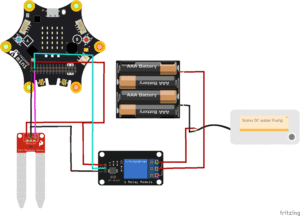
Here’s how different components connect:
Connect the soil moisture sensor:
Detects whether the soil is wet or dry
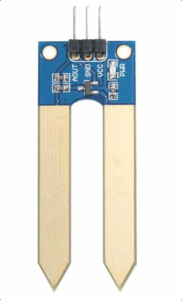
VCC connects to Calliope 3V
GND connects to Calliope GND
Analog OUT connects to Calliope Pin P0
Connect the 3V relay module:
Acts as an electronic switch to control the higher-power
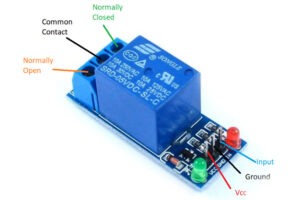
- VCC connects to the 3V pin on the Calliope Mini (since the coil operates at 3V).
- GND connects to the GND of the Calliope Mini.
- IN (Input) connects to Pin 1, which sends a digital signal to activate or deactivate the relay.
On the relay output side (the high-current side):
- The COM terminal connects to the positive terminal of the external battery.
- The NO (Normally Open) terminal connects to the positive wire of the DC water pump.
- The pump’s negative wire connects directly to the negative terminal of the external battery.
Connect the DC water pump:
Waters the plants automatically.
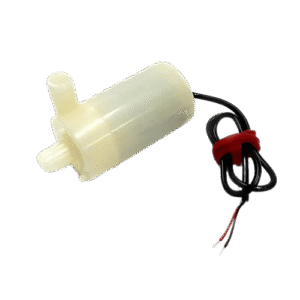
Positive (+) terminal → connect to the NO (Normally Open) pin on the relay module
Negative (–) terminal → connect to negative (–) terminal of the battery
When the soil is dry, Calliope activates the relay, which switches ON the pump. Water flows through your small sprinkler and waters the plant automatically!
The Project Code
Follow these steps carefully to open and explore the project in MakeCode for Calliope Mini:
When you open the link, you will see a few colorful blocks that makes the project.
Next, click Edit Code tab to be directed to the MakeCode editor
Uploading the Code
Plug in your Calliope Mini to your computer using a USB cable, then follow the steps in the video to upload your code and bring your project to life!
Understand the Code
| Code Block | What It Does |
|---|---|
set soil to 0 | Creates a variable called soil and sets its starting value to 0. This variable will store the soil moisture reading. |
forever | Repeats the blocks inside it continuously so the soil moisture is checked all the time. |
set soil to analog read pin P0 | Reads the soil moisture sensor value from pin P0 and saves it in the soil variable. |
if soil < 200 then | Checks if the soil moisture level is below 200, meaning the soil is too dry. |
show sad icon | Displays a sad face to show that the soil is dry and needs water. |
digital write pin P1 to 1 | Turns ON the water pump connected to pin P1. |
pause 3000 ms | Keeps the pump running for 3 seconds to water the soil. |
else | Runs when the soil moisture value is 200 or higher (soil is wet enough). |
show happy icon | Displays a happy face to show the soil has enough water. |
digital write pin P1 to 0 | Turns OFF the water pump to stop watering. |
pause 500 ms | Waits half a second before checking the soil moisture again. |
Troubleshooting the code
Pump not turning on?
Check if the relay IN pin is connected to P1 and the pump is connected to the external battery, not the Calliope Mini.Soil reading always high or low?
Ensure the sensor is firmly inserted into the soil and connected to P0.Pump runs non-stop?
Lower the dryness threshold (e.g., 350 → 300) depending on your soil type.Calliope restarts or freezes?
The pump must not draw power directly from the Calliope—use the external battery pack.
What You Have Learned
How soil moisture sensors work
How relays safely control motors and pumps
How microcontrollers make decisions using sensor data
How automation saves water and supports healthy plant growth
How real smart irrigation systems in farms work
Extra Challenge
Add a Reset Button!
Connect a push button to Pin P2, and when pressed, reset the watering cycle or clear plant warnings.Create a water-level sensor that warns when the tank is empty.
Add a buzzer that sings a “rain song” when the plant is dry.
Use LEDs to show moisture level: green = good, yellow = okay, red = very dry.
Add a small display or MakeCode graph to track moisture over time.
Build a cardboard “Smart Garden House” around your system and decorate it.
AI Extension Ideas
Use Edge Impulse to build, train, and deploy machine learning (ML) model to make their plant watering system even smarter. The AI learns from soil moisture levels and figures out when plants are "thirsty" or "happy".
For example:
- Plant Predictor: The Calliope Mini watches how the soil changes and learns the perfect time to water plants.
- Fun Test Game: Students can test the AI by pouring water slowly or quickly and seeing if the system waters the plant at the right time.