
Learning Overview
In this project, learners explore weather conditions and UV exposure using the Calliope Mini to collect real data such as temperature and UV levels. They program the device to display safety alerts that help guide everyday decisions, like outdoor play or clothing choices. We have included extra challenges that encourage learners to experiment with different locations, times of day, and alert designs, making learning fun and engaging. Through this hands-on experience, learners build problem-solving, data interpretation, and health awareness skills, while discovering how coding, robotics and smart technologies support safe and informed choices.
What You will Need
| Item | Purpose |
|---|---|
| Calliope Mini V3 | Main microcontroller that runs the weather program |
| DHT11 Sensor | Measures temperature and humidity |
| UV Sensor | Detects UV intensity from sunlight or UV lamp |
| Jumper Wires | Connect sensors to the Calliope Mini |
| External Battery Pack (optional) | Powers the Calliope outdoors |
| USB Cable | For coding and uploading the program |
Understand the Circuit
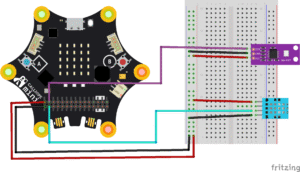
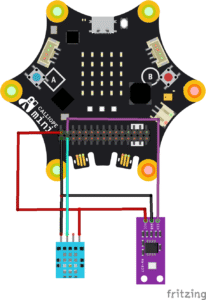
Here’s how different components connect
DHT11 Sensor
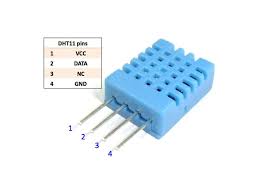
VCC → connects to Calliope 3V
GND → connects to Calliope GND
DATA → connects to Calliope Pin 0 (P0)
UV Sensor
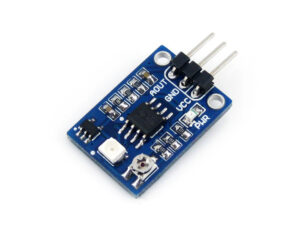
OUT → connects to Calliope P1
VCC → connects to Calliope 3V
GND → connects to Calliope GND
This setup allows the Calliope Mini to receive temperature, humidity, and UV readings. The LED matrix will display messages such as “HOT,” “COOL,” or “UV HIGH,” and the station can warn users when UV levels become unsafe.
The Project Code
Follow these steps carefully to open and explore the project in MakeCode for Calliope Mini:
When you open the link, you will see a few colorful blocks that makes the project.
Next, click Edit Code tab to be directed to the MakeCode editor
Uploading the Code
Plug in your Calliope Mini to your computer using a USB cable, then follow the steps in the video to upload your code and bring your project to life!
Understand the Code
| Block | What it Does |
|---|---|
| set temperature to 0 | Creates a variable to store the temperature value. |
| set humidity to 0 | Creates a variable to store the humidity value. |
| set uvValue to 0 | Creates a variable to store the UV sensor reading. |
| forever | Repeats the blocks inside all the time so the Calliope Mini keeps checking the sensors. |
| DHT11 → temperature | Reads the temperature from the DHT11 sensor connected to Pin P0. |
| DHT11 → humidity | Reads the humidity from the DHT11 sensor connected to Pin P0. |
| analog read pin P1 | Reads the UV sensor value from Pin P1. |
| show string "T:" | Displays the letter T to show temperature is coming next. |
| show number temperature | Displays the temperature value on the LED matrix. |
| show string "C" | Shows C to mean degrees Celsius. |
| show string "H:" | Displays the letter H to show humidity is coming next. |
| show number humidity | Displays the humidity value on the LED matrix. |
| show string "%" | Shows the percent symbol for humidity. |
| show string "UV:" | Displays UV to show the UV value is coming next. |
| show number uvValue | Displays the UV sensor reading on the LED matrix. |
| pause 1000 ms | Waits 1 second before repeating the process again. |
Troubleshooting the Code
Temperature shows 0°C or 1°C?
The DHT11 may not be connected correctly, check the signal wire.UV reading always low?
Test the sensor under sunlight or a bright UV lamp.Calliope freezes or restarts?
Avoid touching exposed wires — short circuits may reset the board.Humidity values look strange (0% or 255%)?
Ensure the sensor pin is firmly connected to P0.
What You Have Learned
How to read environmental data with sensors
How weather stations measure temperature, humidity, and UV
How to display messages on the Calliope LED matrix
How conditions and safety alerts work in real systems
How coding and electronics combine to solve everyday problems
Extra Challenge
Add a Green/Yellow/Red LED system to show UV safety visually.
Create a sunburn timer that counts down based on UV intensity.
Log temperature, humidity, and UV readings to a CSV file using MakeCode data logging.
Build a cardboard weather station tower and mount your Calliope on it.
Add a buzzer alarm when humidity drops (very dry) or rises (rain warning).
AI Extension Ideas
Use Edge Impulse to build, train, and deploy machine learning (ML) model to make their weather project smart and interactive. The AI learns from temperature and UV readings and recognizes when conditions are safe or dangerous.
For example:
- Weather Predictor: The Calliope Mini observes patterns in the data and learns what counts as hot, cold, or high UV.
- Safety Alerts: When the AI predicts extreme conditions, it can display a warning message, flash a light, or play a short sound to alert students.
- Fun Test Game: Students can test the AI by placing the device in different spots (sunny, shady, indoors) and see if it guesses the conditions correctly.