
Learning Overview
In this project, learners explore how technology works using the Calliope Mini and Light Emitting Diode (LED). They will write simple code to make LEDs turn on and off, creating fun patterns, just like the lights in toys! We have included extra challenges for learners to experiment with different speeds and designs to make learning playful and exciting. Through this hands-on experience, learners develop logical thinking, problem-solving skills, and confidence while discovering the basics of coding and robotics.
What You will Need
| Item | Purpose |
|---|---|
| Calliope Mini | The main microcontroller used to program and control the LED |
| LED | The light we will make blink |
| Resistor (100–220Ω) | Protects the LED from too much current |
| Jumper Wires | Used to connect the LED to the Calliope Mini |
| USB Cable | To connect Calliope to the computer for programming |
Understand the Circuit
Calliope Mini has built-in LED lights, but for this project, we will use an external LED to learn about circuits.
An LED has two legs:

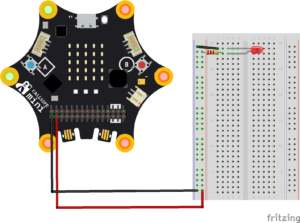
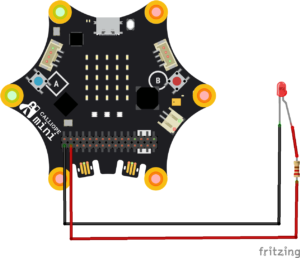
Long leg (Anode) → Connects to P0 (Pin 0) on the Calliope Mini
Short leg (Cathode) → Connects to GND (Ground) on the Calliope Mini
Circuit Connections
Place the LED on the breadboard.
Connect the short leg (–) of the LED to GND on the Calliope Mini.
Connect the long leg (+) of the LED to one end of the 220Ω resistor.
Connect the other end of the resistor to Pin 0 on the Calliope Mini.
The Project Code
Follow these steps carefully to open and explore the project in MakeCode for Calliope Mini:
When you open the link, you will see a few colorful blocks that makes the project.
Next, click Edit Code tab to be directed to the MakeCode editor
Uploading the Code
Plug in your Calliope Mini to your computer using a USB cable, then follow the steps in the video to upload your code and bring your project to life!
Understand the Code
| Code Block | What It Does |
|---|---|
forever | Runs the code inside repeatedly in a loop. |
digital write pin P0 to 1 | Turns the LED or device connected to pin P0 ON (sends a HIGH signal). |
pause 500 ms | Waits 500 milliseconds (half a second) before running the next block. |
digital write pin P0 to 0 | Turns the LED or device connected to pin P0 OFF (sends a LOW signal). |
pause 500 ms | Waits 500 milliseconds before the loop repeats. |
Troubleshooting the code
LED not lighting?
Check if the LED legs are in the correct direction—long leg to P0, short leg to GND.LED stays ON or OFF?
Make sure you added both the ON and OFF commands with pauses.Nothing works?
Confirm your Calliope Mini is well connected via USB and the program has been downloaded.LED very dim?
Ensure the resistor is not too large. Use 100–220Ω only.
What You Have Learned
How to build a simple LED circuit
How Calliope Mini controls digital outputs
How to write basic MakeCode programs
How timing and loops work in microcontrollers
The foundation of many real-world electronics (traffic lights, alarms, signals)
Extra Challenge
Make the LED blink faster or slower by changing the pause value.
Use two LEDs on P0 and P1 and make them blink like police lights!
Create a SOS Morse Code blinker.
Add sound, make a beep each time the light turns on!
AI Extension Ideas
Use Edge Impulse to build, train, and deploy machine learning (ML) models to make the blinking light system more intelligent and interactive. The AI can learn from different LED patterns and predict which sequence is being shown.
For example:
- Pattern Predictor: The AI observes how the LEDs blink and learns what each “short” or “long” sequence means.
- Interactive Response: When the AI recognizes a pattern, it can trigger fun reactions like showing a smiley face, playing a tune, or lighting up another LED.
- Fun Test Game: Students create different blinking sequences and see if the AI can guess them correctly. They can experiment with speed, order, and combinations.