
In this project, you will learn how to measure temperature using a DHT11 temperature and humidity sensor and control a fan using a 3V relay. You will understand how sensors provide data to microcontrollers, and how actuators like motors respond to conditions. Using the Calliope Mini V3, you will gain hands-on experience with wiring, coding, and creating an automated system that reacts to the environment. This project demonstrates how everyday devices like smart fans or air conditioners work, and show students the practical applications of electronics and programming in real life.
What You Will Need
| Component | Purpose |
|---|---|
| Calliope Mini V3 | Microcontroller to read sensor and control fan |
| DHT11 Sensor | Measures temperature and humidity |
| Small DC Motor | Acts as a fan |
| 3V Relay Module | Switches the motor ON/OFF safely |
| AA Battery Pack (2 × AA) | Powers the motor independently |
| Jumper Wires | Connect components |
| Breadboard | Makes wiring easy |
Understand the Circuit
DHT11 Sensor (Temperature & Humidity Sensor):
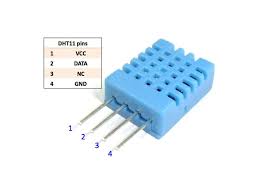
VCC pin → Connect to 3V on the Calliope Mini (powers the sensor).
GND pin → Connect to GND on the Calliope Mini (common ground).
Data pin → Connect to Pin 0 (P0) on the Calliope Mini (sends temperature data).
3V Relay Module (Switch for the Motor):
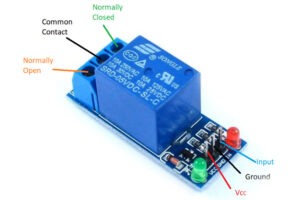
VCC pin → Connect to 3V on the Calliope Mini (powers the relay).
GND pin → Connect to GND on the Calliope Mini (common ground).
- IN pin → Connect to Pin 1 (P1) on the Calliope Mini (controls relay ON/OFF).
DC Motor (Fan) Connection via Relay:
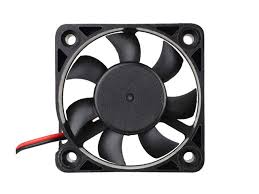
Motor positive (+) wire → Connect to COM terminal of the relay.
Motor negative (-) wire → Connect to negative terminal of the battery pack.
NO terminal (Normally Open) of the relay → Connect to positive terminal of the battery pack.
This setup allows the relay to control the flow of power from the battery to the motor.
How It Works Together:
The Calliope Mini reads temperature from the DHT11 sensor via P0.
If the temperature is above 28°C, the Calliope sends a signal from P1 to the relay, turning it ON. This allows current from the battery pack to flow to the motor, turning the fan ON.
If the temperature is 28°C or below, the Calliope turns the relay OFF, stopping the motor.
Circuit Diagram With Breadboard
Circuit Diagram Without Breadboard
The Project Code MakeCode
Follow these steps carefully to open and explore the project in Microsoft MakeCode for Calliope Mini:
When you open the link, you will see a few colorful blocks.
Next, click Edit Code tab to be directed to the MakeCode editor
Uploading The Code
Understand MakeCode Blocks
| Block/Code Section | What it does |
|---|---|
input.temperature() | Reads temperature from the DHT11 sensor |
if (temp > 28) | Checks if temperature is above 28°C |
pins.digitalWritePin(P1, 1) | Turns the relay (and motor) ON |
pins.digitalWritePin(P1, 0) | Turns the relay (and motor) OFF |
basic.pause(2000) | Waits 2 seconds before reading again |
Troubleshooting the Code
Motor doesn’t turn ON: Check battery connections and relay wiring. Ensure IN pin is connected to P1.
Temperature not reading correctly: Make sure DHT11 data pin is connected to P0 and sensor has 3V power.
What You Have Learned
How sensors collect real-world data and send it to a microcontroller.
How relays safely control motors using low-voltage signals.
Basic programming logic to automate systems based on conditions.
How to connect and test simple circuits.
Extra Challenge
Control fan speed using PWM instead of simple ON/OFF.
Use a buzzer to alert when temperature is too high.
Add a second sensor to control fan based on humidity as well.
AI Extension Ideas
Integrate a TinyML model to predict when the fan will be needed based on historical temperature data.
Use AI to create a “smart weather fan” that adjusts automatically to forecasted room conditions.