
Learning Overview
In this project, learners explore how technology can reduce flood impact and protect communities using a water level sensor, buzzer, servo motor, and Micro:bit. They build an early warning and flood gate control system, connecting coding, robotics, and automation to real-life flood situation. We have included extra challenges that encourage learners to experiment with designs and timing, making learning fun and hands-on. Through this experience, learners develop problem-solving skills, safety awareness, and confidence. The project also introduces AI ideas, showing how smart flood systems can analyze water patterns, predict rising levels, and trigger early alerts.
What You will Need
| Item | Purpose |
|---|---|
| BBC Micro:bit | The brain of the system that reads sensors and controls parts |
| Water Level Sensor | Detects how high the water is |
| Active Buzzer (3V) | Makes a sound when water is too high |
| Servo Motor (9g) | Moves a small flood gate or barrier |
| 5V External Battery Pack | Powers the servo motor |
| Jumper Wires | Connect all parts together |
| USB Cable | Used to program or power the Micro:bit |
Understand the Circuit
Let’s break down how each part connects and functions:
Water Level Sensor
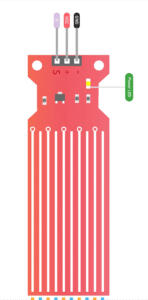
The water level sensor continuously measures how high the water is and sends an analog signal to the Micro:bit.
Connections:
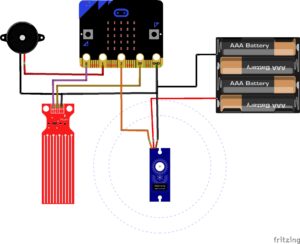
VCC → connects to 3V on Micro:bit (for power)
GND → connects to GND on Micro:bit (for ground)
Signal (S) → connects to Pin P0 on Micro:bit
Active Buzzer

The buzzer gives an audible alert when the water level rises above the set threshold.
Connections:
Positive (+) → connects to Pin P1 on Micro:bit
Negative (–) → connects to GND on Micro:bit
Servo Motor
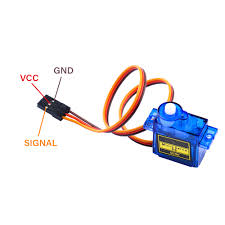
The servo motor simulates a floodgate mechanism. When the water becomes too high, it automatically rotates to close the gate or barrier, helping control the flood flow.
Connections:
- Servo red wire (VCC) → connect to 5V battery positive (+)
- Servo brown or black wire (GND) → connect to 5V battery negative (–)
- Micro:bit GND pin → connect to 5V battery negative (–) (common ground)
- Servo orange or yellow wire (signal) → connect to Micro:bit pin P2
The Project Code
Follow these steps carefully to open and explore the project in Microsoft MakeCode for Micro:bit:
When you open the link, you will see a few colorful blocks that makes the project.
Next, click Edit Code tab to be directed to the MakeCode editor
Uploading the Code
Plug in your Micro:bit to your computer using a USB cable, then follow the steps in the video to upload your code and bring your project to life!
Understand the Code
| Code Block | Purpose |
|---|---|
analogReadPin(P0) | Reads the analog signal from the water level sensor to determine how high the water is. |
plotBarGraph() | Visually displays the water level on the Micro:bit’s LED screen — higher water equals more bars. |
servoWritePin(P2, angle) | Rotates the servo motor to open (0°) or close (90°) the floodgate based on water level. |
if statement | Checks if the water level is above a certain threshold and triggers both the buzzer and servo movement when needed. |
Troubleshooting the Code
- IMPORTANT: Make sure the Servo motor extension is added in MakeCode— go to Extensions → search “servo” → Add.
If the servo doesn’t move, confirm it’s connected to P2 and powered (3V line).
If the buzzer is silent, check that it’s on P1 and the polarity is correct.
Important: Adjust the water level sensor threshold (200-600) depending on how sensitive the sensor is.
What You Have Learned
- How to integrate multiple components (sensor, buzzer, servo).
- How to automate physical actions using servo motors.
- How to design flood mitigation systems using sensors.
- How to visualize environmental data and respond automatically.
Extra Challenge
Use a radio function to send alerts to another Micro:bit placed in a monitoring station.
Add a second threshold to partially close the gate before full closure.
Display real-time water level readings on an external LCD or OLED screen.
AI Extension Ideas
Use either Micro:bit's CreateAI or Edge Impulse to build, train, and deploy machine learning (ML) models to make the flood system smart and helpful. The AI can learn from water level changes and predict when flooding might happen.
For Example:
Flood Predictor: The Micro:bit observes how fast the water level rises and learns what “safe” and “danger” levels look like.
Early Warning Helper: Before the water gets too high, the AI predicts danger and makes the buzzer beep early or moves the gate slowly.
Fun Test Game: Students pour water slowly or quickly and see if the AI guessed correctly.