
Learning Overview
In this project, learners explore how technology can monitor air quality and protect health using a Micro:bit and air quality sensor. They measure pollution levels and program alerts for unsafe air, connecting robotics, coding, science, and environmental awareness to real-life situations at home, school, and outdoors. We have included extra challenges that encourage learners to experiment with different scenarios, making learning fun and interactive. Through this hands-on experience, learners build creativity, problem-solving skills, and confidence. The project also introduces AI ideas, showing how smart systems can predict pollution trends and help communities stay safe and healthy.
What You will Need
| Item | Purpose |
|---|---|
| BBC Micro:bit | Programmable microcontroller for running the project |
| MQ-2 Gas Sensor | Detects gas levels like smoke, LPG, and CO |
| Green LED | Indicates good air quality |
| 220Ω Resistor | Protects the LED from too much current |
| Buzzer (active) | Sounds an alert when air quality is poor |
| Breadboard (optional) | Makes connecting components easier without soldering |
| Jumper Wires | Connect components (male-to-female and male-to-male) |
| USB Cable | Connects the Micro:bit to your computer |
Understand the Circuit
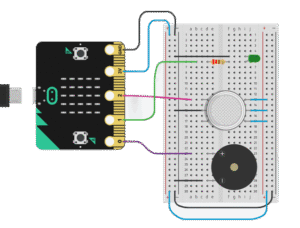
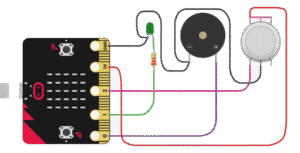
Let’s bring your air quality system to life! You will connect the MQ-2 gas sensor, a green LED, and a buzzer to your BBC Micro:bit.
The Micro:bit will:
Read air quality data from the MQ-2 sensor
Light up the green LED when air is clean
Sound the buzzer when air quality becomes poor
Let’s learn how to connect each component.
The Green LED:
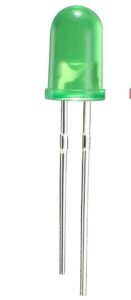
Long leg (+) → connects to Micro:bit Pin 1 through a 220Ω resistor
Short leg (–) → connects to GND on Micro:bit
The Buzzer:

Positive (+) → connects to Pin 0 on Micro:bit
Negative (–) → connects to GND on Micro:bit
MQ2 Gas Sensor:
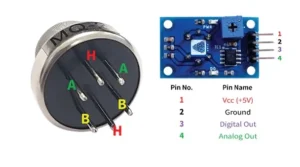
VCC → connects to 3V on Micro:bit
Ground (GND) → connects to GND on Micro:bit
Analog Out → connects to Pin 2 on Micro:bit
The Project Code
Follow these steps carefully to open and explore the project in Microsoft MakeCode for Micro:bit:
When you open the link, you will see a few colorful blocks that makes the project.
Next, click Edit Code tab to be directed to the MakeCode editor
Uploading the Code
Plug in your Micro:bit to your computer using a USB cable, then follow the steps in the video to upload your code and bring your project to life!
Understand the Code
| Code Block | What It Does |
|---|---|
set air_quality to 0 | Creates a variable called air_quality and sets its starting value to 0. This variable stores the air quality sensor reading. |
forever | Repeats the blocks inside continuously so air quality is monitored all the time. |
set air_quality to analog read pin P2 | Reads the air quality sensor value from pin P2 and saves it in the air_quality variable. |
if air_quality > 400 then | Checks if the air quality value is above 400, meaning the air is polluted or unsafe. |
digital write pin P0 to 1 | Turns ON the warning LED or alarm connected to pin P0. |
digital write pin P1 to 0 | Turns OFF the safe/green LED connected to pin P1. |
else | Runs when the air quality value is 400 or below (air is clean). |
digital write pin P0 to 0 | Turns OFF the warning LED or alarm. |
digital write pin P1 to 1 | Turns ON the safe/clean air LED. |
pause 1000 ms | Waits 1 second before taking the next air quality reading. |
Troubleshooting the code
Buzzer not beeping? Check the polarity (+ and -).
LED not lighting? Try lowering the resistor or checking orientation.
No response from MQ-2? Wait 20 seconds for it to warm up.
What You Have Learned
- How to read analog sensor data with the Micro:bit.
- How to use LEDs and buzzers as indicators.
- How to create an environmental monitoring system.
Extra Challenge
Add a red LED that turns ON when the air is polluted.
Display the actual air quality value on the Micro:bit LED screen.
Log readings over time using the serial plotter in MakeCode or Mu Editor.
AI Extension Ideas
Use either Micro:bit's CreateAI or Edge Impulse to build, train, and deploy machine learning (ML) models to make the air quality monitor smart and interactive. The AI can learn from sensor data and predict what might happen next.
For example:
Pollution Predictor: The Micro:bit observes past air quality readings and predicts when the air might become unhealthy, triggering the LEDs or buzzer earlier.
Fun Alert Game: Students can test different rooms or outside areas, and the AI tries to guess which areas will be safe or unsafe next.
Smart Display: AI can adjust the LED color or blink speed based on predicted pollution levels, teaching kids about forecasting and environmental awareness.